


LifeLock Identity by Norton
4.312.87K Reviews
App Specs
- Version
- 3.7
- Updated On
- License
- Free
- Downloads
- 5,000,000+
- Developer
- NortonMobile
- Categories
- Finance
- Platform
- Android, iOS
Screenshots
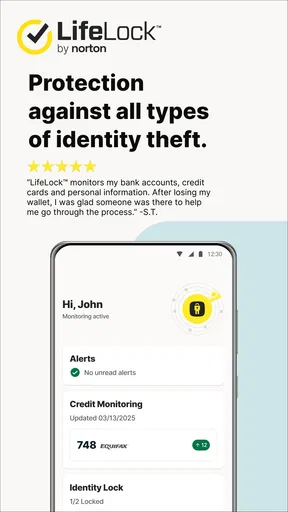
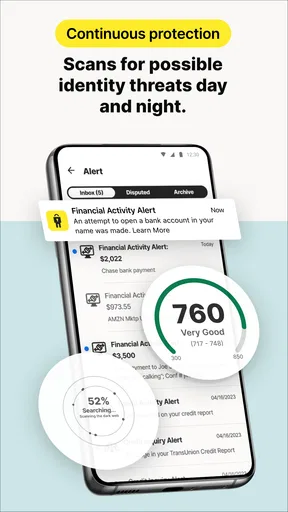
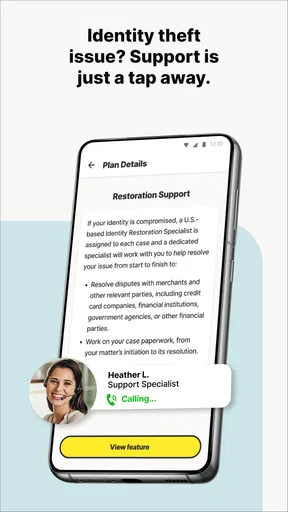
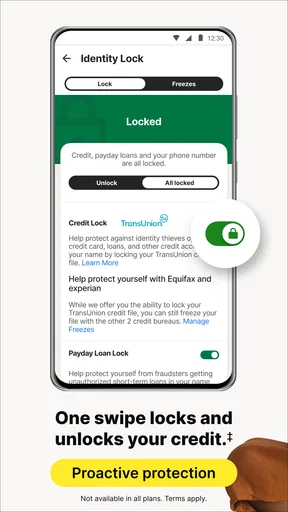

 Analysis by AppCompare
Identity protection on a phone is most useful when it helps me notice a problem at the moment I can respond, rather than leaving me to check accounts manually. That’s the experience I look for in LifeLock Identity by Norton: a finance app from NortonMobile built around alerts and mobile access to identity-protection tools. Its appeal depends less on flashy screens than on whether its notices fit naturally into a busy day and give me a clear reason to take the next step.
When a useful alert meets a weak connection
Alerts are the part of an identity app most likely to be affected by everyday connectivity. A notice can only help when it reaches the phone and I can open it, so I treat the app as a way to stay informed rather than as a substitute for securing my accounts directly. If a message arrives while I’m moving between networks or in an area with a poor signal, I would wait until I have a reliable connection before reviewing details or acting on them.
That distinction matters: an alert is a prompt to investigate, not proof that a threat has been resolved. I would use it to decide what to check next, then go through the relevant account or service using its official channel. This habit avoids rushing into a response simply because a notification sounds urgent, and it keeps the app in its proper role as a monitoring companion.
Designed for phone-sized moments
The mobile format makes the most sense for short check-ins: glance at a notification during a break, open the app when you have a few quiet minutes, and return to the rest of your day. That is a better fit than expecting to do a full identity-security review while standing in a queue. The practical benefit is having a dedicated place to look when something calls for attention, not needing to turn every spare moment into a security task.
For a realistic example, imagine getting a notification while commuting. I would avoid trying to investigate it on a crowded train or on an unstable connection. I’d note that it needs attention, wait until I can focus, and then review it calmly. That small pause is useful because identity-related messages can feel stressful; a deliberate response is usually better than hurriedly tapping through screens without checking what the notice actually asks me to do.
What to do when the app cannot help right away
No phone app can remove the need for a sensible fallback. If I cannot load a screen, I would first check whether my connection is working, then try again when it is stable. I would not assume that a delayed notification means there is no issue, or that a loading problem itself signals a security incident. Keeping access to important accounts through their official apps or websites gives me another route for urgent checks.
I also find it helpful to separate the phone’s notification layer from the app’s own information. A notification may be easy to miss among messages and other alerts, so I would make a routine of opening the app periodically when I have a dependable connection instead of relying entirely on pop-ups. That is a simple way to reduce the chance that a busy day or a temporary network interruption leaves me unsure whether I have reviewed something important.
Worth Reading Before You Choose

EA SPORTS FC Mobile 26 Is a Bigger Football Game, but It Takes Time

Flipboard Shows What News Apps Must Do Beyond the Feed

Switching to Android Auto Means Rethinking Your Driving Routine

Google Calendar Makes a Crowded Week Easier to Manage

Ludo King Makes the Most of the Minutes Between Plans

Baby Panda World Brings Quick Play to Modern Phones, but Its Game Library Feels Busy
Privacy-minded use without overcomplicating things
Identity monitoring involves sensitive personal information, so I would take a moment during setup to understand what I am being asked to provide and why it is needed for the service I plan to use. I would also avoid entering sensitive details while someone else can see my screen, and I would keep my phone protected with its usual lock. These are small habits, but they make more sense than treating an identity app as a reason to become careless elsewhere.
There is a trade-off here: the more personal details a monitoring service has available, the more relevant its checks may be, but handing over that information calls for trust and deliberate choices. I would not sign up simply because an app is familiar; I would decide whether its services match my needs and review any purchase choices carefully before committing. The app is free to download, while in-app purchases range from ten dollars to three hundred thirty-nine dollars and ninety-nine cents per item, so the cost of the particular option matters.
LifeLock Identity is aimed at everyone, and it has a 4.4 average from around 42,000 ratings, with over five million installs. Those figures suggest that it has reached a broad audience, but they do not tell me whether a particular person needs identity monitoring. I would judge it by whether I want a central mobile place for alerts and whether I am comfortable sharing the information required to use the service.
First Impressions and Setup
Jumping into LifeLock Identity by Norton, the first thing that caught my eye was its straightforward design. It's not flashy, but it gets the job done. Installing it on my phone was a breeze, and I was up and running within minutes. The app guided me through the setup process with step-by-step instructions, which was super helpful. No tech expertise needed here, thankfully!
Once you're in, the app prompts you to enter personal information that it will monitor for suspicious activity. It might feel a bit unnatural to hand over this info at first, but hey, that's the whole point, right? To keep it safe.
Features You’ll Love
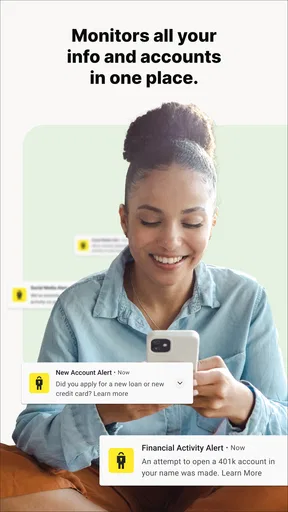
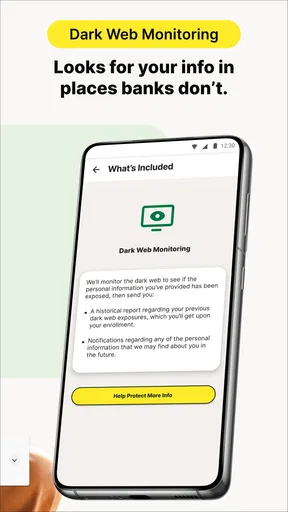
Let's talk about what this app can do for you. One of the main features is the identity theft protection. The app scans the dark web and sends you alerts if your personal information is spotted where it shouldn’t be. I appreciated the real-time alerts—it's like having your very own personal watchdog.
Another cool feature is the credit monitoring. LifeLock keeps an eye on your credit scores and alerts you to any significant changes. This is especially handy if you're planning to make big financial moves, like buying a home or car.
Plus, the app offers a VPN for secure browsing, which is a neat addition for those of us who frequently use public Wi-Fi. Who doesn’t love a little extra protection when surfing the web at a coffee shop?
Using the App Daily
Now, let's talk about the day-to-day experience. The app sends alerts directly to your phone, so you’re always in the loop about your personal info. I found the alerts to be timely and informative, without being overly intrusive. It’s nice to know that someone’s got your back, especially when it comes to safeguarding your identity.
One thing I really liked was the ease of navigating through the app. The dashboard is clear and well-organized, making it simple to find what you need. Whether you want to check out recent alerts or review your credit score, it's all just a tap away.
Support and Assistance
Let's face it, sometimes you need a little help. LifeLock offers 24/7 support, which is a huge relief. I had a couple of questions during setup and reached out to their customer service. They were responsive and solved my issues quickly. It's nice to know there's a team ready to assist whenever you need it.
Moreover, if the worst happens and you fall victim to identity theft, LifeLock provides a dedicated restoration team to help you get things back on track. This is a feature I hope I never have to use, but it’s reassuring knowing it’s there.
Choosing it over familiar alternatives
Compared with checking a credit account or bank app on its own, an identity-focused service is meant to gather a different kind of signal: it can alert me to information that may be circulating beyond the accounts I routinely use. Those usual apps remain important for transactions and account-specific notices, but they do not replace a dedicated identity-monitoring approach. I see LifeLock as a companion to them, not a reason to stop checking statements or responding to messages from financial providers.
It is also different from relying only on basic precautions such as unique passwords and careful handling of suspicious messages. Those habits help reduce exposure, while monitoring can give me a reason to investigate after personal information appears in an unexpected context. Neither approach makes the other unnecessary. If I mainly want a tool for budgeting or tracking spending, this is the wrong category of app; if I want a mobile place for identity-related alerts, the focus is more relevant.
Who will get the most from it
I can see this fitting someone who wants to keep an eye on identity concerns while managing a busy schedule, especially if they prefer phone alerts to remembering to check multiple services. It may also suit a person approaching a major financial decision who wants to pay closer attention to changes and suspicious activity. In that situation, I would still pair the app with direct checks of the financial accounts involved rather than treating one dashboard as the whole picture.
On the other hand, I would skip it if I am not comfortable sharing personal information with an identity-protection service, or if I only need a simple way to check one account. People who do not want additional notifications may also prefer to keep their routine limited to the alerts from their bank and credit providers. The best choice depends on whether broader monitoring is worth the extra service and the care needed to manage its information and costs.
Version, cost, and expectations
The app is free to install, but some options involve in-app purchases, so I would check the details shown for a plan before buying rather than assume every protection feature is included at no cost. The listed version is 3.1, and it requires Android 10 or later. That makes device compatibility a quick first check for Android users; iOS users should look at the requirements shown for their own device before relying on the app.
It was released on November 26, 2018, and the current version is not a reason by itself to expect a particular set of features or performance on every phone. I would keep the app updated through the relevant app store and make sure notifications are configured in a way I can actually notice. Most importantly, I would treat monitoring as one layer of a personal-security routine, not as a guarantee that every misuse of identity will be caught.
Final Thoughts
So, is LifeLock worth it? In my opinion, yes. It's a comprehensive app that provides peace of mind in a world where digital threats are all too common. Whether you're tech-savvy or not, LifeLock is designed to be user-friendly, making it a great choice for anyone looking to protect their identity.
While it might not have the most eye-catching design, what it lacks in aesthetics, it makes up for in functionality. The combination of identity theft protection, credit monitoring, and secure browsing makes it a solid choice for those concerned about their online safety.
If you're in the market for a reliable identity protection service, give LifeLock a try. It’s a small investment for a whole lot of security.
Pros
- Comprehensive identity theft protection.
- Real-time alerts for suspicious activity.
- User-friendly interface and navigation.
- 24/7 live member support available.
- Includes credit monitoring services.
Cons
- Subscription can be costly.
- Limited features in the basic plan.
- Occasional false positive alerts.
- Requires personal information to set up.
- App interface can be slow at times.
FAQs for LifeLock Identity by Norton
What is LifeLock Identity by Norton and how does it work?
LifeLock Identity by Norton is a comprehensive identity theft protection service that monitors your personal information, detects potential threats, and helps restore your identity if compromised. It works by scanning a wide range of databases for your personal data, and alerts you to suspicious activity. The app also offers recovery assistance and reimbursement for stolen funds.
Does LifeLock Identity by Norton offer real-time alerts?
Yes, LifeLock Identity by Norton provides real-time alerts to notify you of any suspicious activity related to your personal information. These alerts can include credit inquiries, data breaches, and other potential threats. Immediate notifications enable you to respond quickly to potential identity theft issues, minimizing potential damage.
What platforms is LifeLock Identity by Norton available on?
LifeLock Identity by Norton is available for both Android and iOS devices. The app can be easily downloaded from the Google Play Store or the Apple App Store. It is designed to provide seamless monitoring and protection directly from your mobile device, ensuring that you have constant access to security features.
What are the subscription plans for LifeLock Identity by Norton?
LifeLock Identity by Norton offers several subscription plans tailored to different needs and budgets. Plans typically include varying levels of identity and credit monitoring, with higher-tier plans offering more comprehensive coverage and features like Social Security number alerts and credit report access. Pricing details are available on their website or via the app store.
How does LifeLock Identity by Norton assist in identity recovery?
In the event of identity theft, LifeLock Identity by Norton provides a dedicated Identity Restoration Specialist to guide you through the recovery process. They assist in contacting banks, credit card companies, and other entities to resolve fraudulent activity. Additionally, the service includes a reimbursement policy to cover certain out-of-pocket expenses.


